No Design Skills? No Problem. Create 3D YouTube Intros with Krikey AI
With Krikey AI’s YouTube Intro Maker, you can create amazing 3D animation videos in minutes. The Free Intro Maker is perfect for making an intro video with animation.
Key Takeaways about Free YouTube Intro Maker
- Hook Viewers Instantly: First impressions on YouTube happen in the first 3 to 5 seconds. Krikey AI helps creators stop the "thumb-scroll" by providing high-energy 3D animations and "rewarding" viewers for clicking by meeting the expectations set in the thumbnail and title.
- Professional Quality with Zero Technical Skill: The platform allows anyone - from vloggers to fitness coaches - to create professional 3D intros in minutes. It features an intuitive, no-code interface with drag-and-drop tools for custom character rigging, hand gestures, and voice dubbing in over 20 languages.
- Highly Customizable & Multi-Platform Ready: Creators can tailor their intros for any format (including vertical for Shorts/TikTok) and export them as MP4, GIF, or FBX files. Advanced features like video-to-animation allow you to record movement on your phone and instantly turn it into a 3D character animation.
What is a free YouTube intro maker?
A YouTube intro maker is a specialized video editing tool designed to create the short, high-energy opening sequence (usually 5–10 seconds) that appears at the start of a video. Its primary job is to establish your brand, hook the viewer’s attention, and signal the quality of the content to follow.
While traditional editing software can be complex, modern AI-powered tools like Krikey AI have transformed the process from a technical chore into a quick creative win.
First impressions matter. On YouTube, you may only have 3 seconds to make that first impression before a viewer scrolls on to the next. If your viewer drops off within the first 5 seconds, they will never stick around and see the rest of the story you’ve worked so hard to craft. So, make that first impression count with a YouTube intro that will stop the viewer’s thumb from scrolling to the next video.
Consider your YouTube intro a reward to the viewer for clicking on your video’s thumbnail. Reward them by meeting the expectations you set up for the video in your title and thumbnail. Do it all with our free intro maker and online editor.
That’s a lot of pressure to place on a single YouTube intro! That’s where Krikey AI’s YouTube Intro Maker comes in. With the Krikey AI YouTube intro maker, your first impression can make a lasting impression. Deep breaths, we’ve got you. (As a bonus, we have an outro maker too.) Shop our 3D cartoon character store to find the perfect character to animate today!
Why Choose Krikey AI for Your YouTube Intro Video?
With Krikey AI’s YouTube Intro Maker, you can create amazing intros free and 3D animation videos in minutes - no coding, design or animation skills required. You can also create your own YouTube intro templates and use Krikey AI for Animation tools to create custom video intro styles.
Our free YouTube intro maker can help you create eye-catching, funny, and engaging 3D animations for your YouTube intros with customized backgrounds, hand gestures, logo reveals and voice dubbing in over 20 different languages! Click the button below to try the free AI Intro generator.
How to make 3D Intro for your Youtube channel: Speed and Efficiency in a Template
Krikey AI YouTube Intro Maker can drastically cut down the time required to produce a video intro or logo reveal. In traditional editing, you might spend hours sifting through footage, selecting music, adjusting transitions, and fine-tuning text animations. With Krikey AI, your intro video can be ready for publishing to your viewers in minutes.
Customization text and how to make a YouTube Intro with our Free Intro Maker
While Krikey AI takes care of the technical details, you still have full editorial control over the customization process. Krikey AI’s YouTube Intro Maker app provides text-to-animation templates that can be adjusted to suit your brand’s personality. You can upload your logo, images, choose your background, make a slideshow and add text that complements your video style.
You can make a free intro and customize your intro made with animation tools. Create a stunning intro or video preview reveals for your channel audience with just a few amazing animations in minutes. You can make a promo video and preview your content before exporting a video, GIF or FBX file from the Krikey video editor. Browse our different aspect ratios and see your content in different tab views on other social media platforms. Just one word - download - and you can share with the world!
No Experience Needed with Free AI Intro Maker
Krikey AI is designed for people with no prior experience in video editing or graphic design. The intuitive editing tool allows you to select a template, make revisions, and export your finished intro within minutes. This allows you to focus on what’s most important, the content, without getting bogged down by the technicalities.
Affordable and Accessible Intros Template in 3D YouTube Intro Maker
Best of all, Krikey AI is free to use once you’ve signed up and set up an account. All you need is access to a desktop computer and WiFi. You can even check out our mobile experience on your smartphones. Go to Krikey.AI and see for yourself!
How to edit your YouTube intro in vertical mode using the Krikey 3D intro maker free tools
One quick tip for editing YouTube intros in vertical mode is to click on "Share" on the upper right hand corner of your screen. Then, go to "Aspect ratio" and select "9:16 (1080x1920)." You'll see your image framed for vertical mode.
Examples of Using Krikey AI’s YouTube Intro 3D Maker
These are examples of ways to use Krikey AI to make an amazing YouTube Intro with 3D animation and cartoon characters.
YouTube Intro Animation Maker for Gaming
Krikey AI for Animation tools includes a video to animation tool where you can create custom 3D gaming animations for your YouTube intros. You can also select from our library of animations and design a custom 3D character for your YouTube channel.
Use our character voice AI tool to add dubbed dialogue as part of your Gaming intro or YouTube intros. Turn your YouTube intro into aesthetic gifs which you can upload and share with fans. A welcome back gif created out of YouTube intros is popular along with aesthetic gifs with clips from your YouTube library.
AI Intro Generator for Educational Content
Krikey AI's free YouTube intro maker tool also has animated text. Select from a variety of animated text styles, edit the text, resize and place anywhere in your video.
Using our animated text feature you can create a video logo for your YouTube intro. A video logo is important to set the education-based aesthetic for your video. We also recommend turning your animated text video logo into an aesthetic gif to share with students!
How to make a YouTube Intro: Vlogs and Lifestyle Channels that can use AI Intro Generator tools
Animation YouTubers don't have to be the only ones who get to have animated YouTube intros! We can help you learn how to animate with our free, no-code text-to-animation software and AI Intro Generator. With just a few clicks using our drag and drop interface you can create a 3D animation video in minutes to use for your YouTube intros.
Check out our YouTube channel for more intro tutorials and sample videos. Our free animation software is being used as an intro creator for YouTube videos and we can't wait to see what you create!
How to make a YouTube Intro: Fitness and Dance Channels
Whether your content features exercise demos or dance choreography, if your content revolves around physical movement then Krikey AI’s YouTube Intro Maker is for you. With Krikey AI’s video-to animation tools, you can record any movement right on your phone then upload it to Krikey AI’s 3D editor which will then convert the movement into animation - in minutes!
How to make a free YouTube intro with Krikey AI Animation
Making a professional 3D intro doesn't have to be a weeks-long project. With Krikey AI, you can go from a blank screen to a high-energy, branded opening in less time than it takes to brew a pot of coffee.
Here is your simple, step-by-step guide to creating your first YouTube intro for free.
Step 1: Open the Krikey AI Dashboard
Head over to Krikey.ai and sign up for a free account.
Step 2: Pick Your 3D "Brand Ambassador"
Every great intro needs a face.
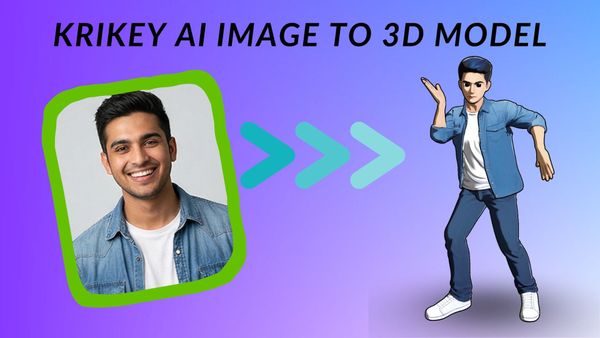
- Browse the Character Gallery to find an avatar that fits your channel’s vibe (Anime, Cartoon, or Realistic).
- If you have a specific vision, you can use the Custom Character tool to build a character to your liking.
Step 3: Animate Your Character
Now, give your intro some energy. You have three easy ways to do this:
- Video-to-Animation: Upload a video of yourself doing a specific movement (like a wave or a dance), and the AI will apply that motion to your 3D character.
- Animation Library: Choose from hundreds of pre-set professional motions like "The Floss," "Hero Landing," or a simple "Greeting."
- Text-to-Animation: Simply type a description of the move you want to see.
Step 4: Add Your Branding & Text
A YouTube intro is your "digital business card," so make it yours:
- Add Text: Use the Animated Text feature to add your channel name.
- Change Backgrounds: Select a background that matches your brand colors or upload your own custom environment.
Step 5: Voiceover and Audio
Let them speak!
- Click on 'Edit Script' to make your character speak. You can type a script (like "Welcome back to my channel!") and the AI will perfectly lip-sync the character in 20+ languages.
- You can also create a music video by clicking on "Music" and typing in your vision.
Step 6: Download & Export
- Aspect Ratio: For a standard video, choose 16:9. If you are making a YouTube Short, click the "Share" button and change the aspect ratio to 9:16 (Vertical).
- Download: Hit the export button to save your file as an MP4 (for video), a GIF (for social media), or even an FBX (if you're a pro using game engines).
Frequently Asked Questions (FAQs) about AI YouTube Intro Makers
Here are frequently asked questions (FAQs) related to AI YouTube intro makers:
What is an AI YouTube intro maker?
An AI YouTube intro maker is a tool that uses artificial intelligence to help users create professional-looking intro videos for their YouTube channels. These tools offer customizable templates, text animations and transitions, making it easy for even beginners to create high-quality intros without needing advanced video editing skills.
How does an AI YouTube intro maker work?
Krikey AI YouTube Intro Maker offers pre-designed templates that users can customize with their own logos, text, and 3D animations.
Can I customize the templates provided by AI YouTube intro makers?
Yes, with Krikey AI YouTube Intro Maker you can customize your own avatars, backgrounds, hand gestures, animations and voice your scripts in over 20 different languages.
Do I need any video editing experience to use an AI YouTube intro maker?
No, Krikey AI YouTube Maker is designed to be beginner-friendly. Krikey AI uses intuitive interfaces with drag-and-drop features, allowing users to create intros without any prior experience in video editing.
How long should my YouTube intro be?
Your YouTube intro should be between 5 to 10 seconds long. It’s essential to keep it short and engaging, as longer intros might lead to viewer drop-off.
Can I use an AI intro maker for free?
Yes, Krikey AI YouTube intro maker is free to use!
What file formats can I export my YouTube intro in?
Most AI intro makers allow you to export your finished video in popular formats such as MP4 or FBX.
Are AI YouTube intro makers compatible with mobile devices?
Yes, Krikey AI YouTube Intro Makers has a mobile experience but best optimized on desktops.
Can I use AI YouTube intro makers for platforms other than YouTube?
Yes, intros created using Krikey AI YouTube Intro Maker can be used across multiple platforms, including TikTok, Instagram, and Facebook.
How long does it take to create a YouTube intro with an AI tool?
With Krikey AI YouTube Intro Maker, you can create a professional-looking intro in less time than it takes to enjoy your morning coffee.